
Download Free Photo Viewer – Lightweight Image Viewer for Windows, Mac & Linux
Overview
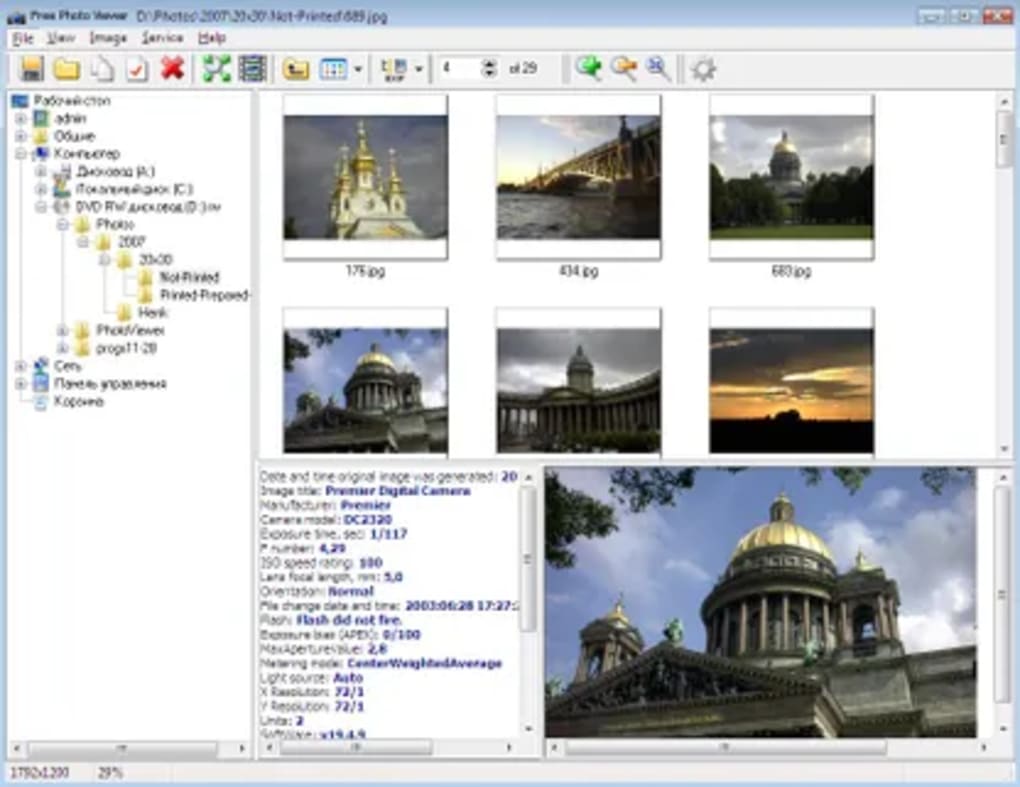
Free Photo Viewer is a **free and lightweight image viewer** designed for personal computers that need a fast, low‑memory solution for browsing photos. Unlike bulky photo management suites, this tool runs comfortably on older or resource‑constrained systems, delivering essential viewing capabilities without demanding a subscription or a hefty install size. It supports the most common image formats—including JPEG, PNG, BMP, GIF, and even RAW files from digital cameras—so users can open, zoom, and pan pictures instantly. In addition to simple viewing, Free Photo Viewer offers a built‑in slideshow mode, making it handy for quick presentations or family gatherings. Because it is engineered to work on slower operating systems, it becomes a viable alternative to heavier applications such as Windows Media Player or Adobe Photoshop LightRoom when the sole goal is to **view** images efficiently. The interface is uncluttered, featuring a classic file‑tree navigation pane on the left and a large preview window on the right. Users can also export images to external displays, such as a widescreen television, for a more immersive viewing experience. Overall, Free Photo Viewer delivers exactly what its name promises: a free, secure, and easy‑to‑use tool for anyone who needs to open pictures without sacrificing system performance.
Key Features
- Ultra‑light footprint: The installer is under 5 MB and uses less than 30 MB of RAM while running.
- Broad format support: Opens JPEG, PNG, BMP, GIF, TIFF, and RAW (CR2, NEF, ARW) files.
- Slideshow mode: Create full‑screen slideshows with adjustable transition speed and timer.
- Zoom & pan: Smooth zooming up to 800 % with mouse wheel or touchpad gestures.
- File‑tree navigation: Quickly browse folders without leaving the application.
- Export & cast: Send images to external monitors, smart TVs, or Chromecast devices.
- Keyboard shortcuts: Arrow keys for next/previous, F11 for full‑screen, and Ctrl + S to save a copy.
- Portable version: Run from a USB stick without installation on Windows, macOS, or Linux.
- Secure updates: Automatic, digitally‑signed patches keep the software safe.
- Multilingual UI: Available in English, Spanish, French, German, and Chinese.
Installation, Usage & Compatibility
Step‑by‑step installation
Downloading and installing Free Photo Viewer is straightforward. Follow these steps:
- Visit the official website and click the Download for Windows (or macOS/Linux) button.
- Save the installer (
FreePhotoViewerSetup.exe,.dmgor.deb) to your computer. - Run the installer and accept the license agreement.
- Choose the destination folder (default is
C:\Program Files\Free Photo Viewer). - Click Install and wait for the progress bar to finish.
- Launch the program from the desktop shortcut or start menu.
First‑time usage tips
When you open Free Photo Viewer for the first time, you’ll see a split pane. Use the left pane to navigate to the folder containing your images. Clicking a thumbnail instantly loads the picture in the right pane. To start a slideshow, select multiple images (Ctrl + click) and press the Play button on the toolbar. You can also adjust the slideshow interval in Settings → Slideshow. For RAW files, the viewer automatically renders a preview; you can switch to the original file’s metadata by clicking the EXIF tab.
Supported operating systems
Free Photo Viewer runs on the following platforms:
- Windows 7, 8, 8.1, 10, and 11 (both 32‑bit and 64‑bit)
- macOS 10.12 Sierra and later (Intel and Apple Silicon)
- Linux distributions with GTK support – tested on Ubuntu 18.04+, Fedora 30+, and Debian 10+
Because the program is written in C++ with minimal external dependencies, it remains responsive even on machines with as little as 2 GB of RAM. Users of older operating systems will appreciate the low CPU usage, which typically stays under 5 % during normal viewing.
Pros, Cons & Frequently Asked Questions
Pros
- Very small installation size and low RAM consumption.
- Supports a wide range of image formats, including RAW.
- Portable version allows usage on any computer without admin rights.
- Simple, uncluttered UI that’s easy for beginners.
- Free, no hidden fees or subscription model.
Cons
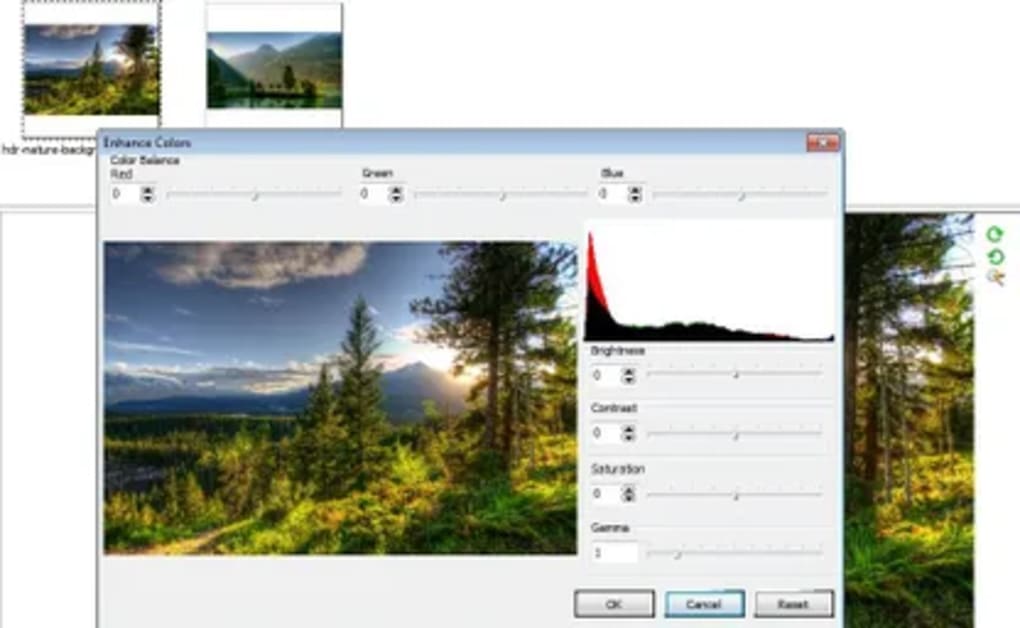
- Lacks advanced editing tools (e.g., color correction, batch processing).
- No cloud integration for syncing across devices.
- Slideshow customization is basic compared to dedicated presentation software.
FAQ – Frequently Asked Questions
-
Is Free Photo Viewer truly free or does it contain hidden ads?
Yes, the software is completely free. There are no advertisements, no trial periods, and no hidden fees. All features are available after the initial download.
-
Can I view RAW files from my DSLR camera?
Absolutely. Free Photo Viewer supports popular RAW extensions such as CR2 (Canon), NEF (Nikon), ARW (Sony), and many others. The preview is generated on the fly without needing external codecs.
-
Does the portable version require installation on each PC?
No. The portable build can be run directly from a USB stick or external drive. Simply copy the folder to the target machine and launch the executable.
-
How often are updates released and are they secure?
Updates are released roughly every 2–3 months. Each update is digitally signed, ensuring that the download is authentic and free from tampering.
-
Can I cast images to a smart TV or Chromecast?
Yes. The “Export & Cast” feature lets you select a connected TV, Chromecast, or other DLNA‑compatible device and display your photos in full‑screen mode.
Reviewer: TechInsights Blog
Rating: ★★★★☆ (4/5)
Free Photo Viewer strikes a great balance between simplicity and functionality. Its lightweight design makes it ideal for older hardware, while RAW support and slideshow capabilities add enough depth for casual photographers. The only drawback is the absence of editing tools, but for a pure viewer that’s an acceptable trade‑off.
Conclusion & Call to Action
If you need a **fast, free, and secure** way to browse your image collection without draining system resources, Free Photo Viewer is a solid choice. It covers all essential viewing tasks, supports a broad range of formats—including RAW—and even lets you cast pictures to larger screens. While it doesn’t replace a full‑featured photo editor, its low‑memory footprint and portable version make it especially appealing for users with older PCs, laptops, or limited storage.
Ready to streamline your photo browsing experience? Download Free Photo Viewer now and enjoy instant, lightweight image viewing on Windows, macOS, or Linux.







